React Server Components: The Good, The Bad, and The React2Shell
Since the first RFC at the end of 2020, React Server Components went through a lot of iterations. A simple feature at first glance[1], packs a lot of nuance and was met with quite mixed enthusiasm. And especially the recent React2Shell exploit left a serious dent in its reputation. That's a shame, because the concept is versatile and powerful, and can still be used in a lot of safe ways.
React for Two Computers#
Dan Abramov's talk and post React for Two Computers is the brilliant explanation that gave me at least the feeling that I understand what's going on. I really suggest you take the time to digest it in detail, but for this article my flawed simplification will have to do:
"React server components" is about pausing execution of components in one environment and seamlessly resuming it in another.
This means there are essentially two components to it. A bundler integration makes sure that we can write coherent[2] code that is correctly deployed to the environment it needs to be at. For example a client bundle and a server bundle. The second part is a model for serialization that turns the React tree into a flat list of elements that appear on the page. This representation supports referencing and lazy loading components as well as streaming them, which means it can gradually build up the interface. If you want to know exactly what this looks like, have a look at the RSC Explorer, because an interactive demo says more than a thousand words.
What RSC Gets Right#
Performance#
The main benefit of that is to improve the largest contentful paint metric, and this performance gain is mostly associated with server side rendering, but that's not the full story. This blog itself uses server components in a couple of ways. The simplest and most impactful one are embedded code blocks. They are built with the Shiki syntax highlighter, which is a quite extensive library, supporting a lot of different languages. Here is a simplified version of the code block component, rendered by the code block component (how meta!):
function CodeBlock(content: string, language: string) {
  const highlighted = highlightCode(content, language);
  return (
    <code>
      <pre>{highlighted}</pre>
    </code>
  );
}
Since this is a server component, code highlighting happens at build time and the library doesn't need to be loaded into the client. If it was built in Gatsby, and I wanted to avoid that performance hit, I would have to put the "highlighting" process into Gatsby's data-layer, so the component gets a pre-highlighted string, which is a rather complex task.
Encapsulation#
The latter is very similar process as how image processing in Gatsby works. To display a cropped or scaled version of an image in Gatsby, one has to request that from its internal GraphQL API and then use a specific react component to display it. An example straight from the documentation:
import React from "react"
import { graphql } from "gatsby"
import Img from "gatsby-image"

export default ({ data }) => (
  <div>
    <h1>Hello gatsby-image</h1>
    <Img fixed={data.file.childImageSharp.fixed} />
  </div>
)

export const query = graphql`
  query {
    file(relativePath: { eq: "blog/avatars/kyle-mathews.jpeg" }) {
      childImageSharp {
        # Specify the image processing specifications right in the query.
        # Makes it trivial to update as your page's design changes.
        fixed(width: 125, height: 125) {
          ...GatsbyImageSharpFixed
        }
      }
    }
  }`;
The childImageSharp GraphQL field contains the processing logic to generate
images, while the <Img> component displays them. Both are very much coupled to
Gatsby and not usable anywhere else. With server components, this can be solved
like this:
async function Image({ src, width, height }: ImageProps) {
  const cropped = await cropImage(src, width, height);
  return <img src={cropped} width={width} height={height} />;
}
The whole image handling can be condensed into a generic cropImage function that is completely framework-agnostic and a simple React component using it. No dependencies to specific data sources or other components. This has no end-user implications (compared to the Gatsby approach), but is a huge step up in terms of developer experience and ecosystem compatibility.
Composability#
Dan Abramov also posted RSC for Astro Developers, which is absolutely worth reading. Astro is heavily marketed as "low javascript payload" and "great for web vitals", and a direct comparison between the technologies puts the performance topic at the top of mind. But even though the article focuses on the right thing, this framing makes people think mainly about performance and easily miss the most important point.
Astro also distinguishes between server and client side components, and it even allows to use almost any modern client side framework. But with the notable difference that each of those client side components creates an island that is isolated from the rest of the page. Two "React islands" on a page can't communicate with each other by the means of traditional React mechanisms, like contexts and the whole island becomes client side code. It has capabilities to pre-render inner parts of the page and inject them as "server islands", but this does not naturally fit together with client components written in React or Vue.
React server and client components however can be arbitrarily nested within each
other. And this website makes use of that in an absolutely not contrived and
totally meaningful way! In case you missed it, the design is inspired by
terminal monospace aesthetics, and if you hit space followed by d, you
should see the debug grid pop up. Every character is exactly aligned to the
grid, but this falls apart as soon as something external is embedded, like an
image or a tweet.
How to solve this mission critical issue? By creating a client side component that draws an adaptive padding around an arbitrary element:
"use client";
/**
 * Simplified version of an adaptive container.
 */
function AdaptiveContainer({ children }: PropsWithChildren) {
  const lineHeight = 24;
  // Use ResizeObserver to get updates on the display size of the child container.
  const [ref, height] = useSizeObserver();
  // Calculate required top/bottom padding to align to grid.
  const pad = (height % lineHeight) / 2;
  return (
    <div style={{ paddingTop: pad, paddingBottom: pad }}>
      <div ref={ref}>{children}</div>
    </div>
  );
}
The <Tweet> is not a big deal, because it is a client component itself:
<AdaptiveContainer>
  <Tweet url={...}/>
</AdaptiveContainer>
But with images this becomes way more apparent, because it will still work with my component outlined above, that does the image processing on the server side.
<AdaptiveContainer>
  <Image src={...} width={800}/>
</AdaptiveContainer>
This concept means that we can retain reactivity across the whole page without workarounds and capitalize on the benefits of server side processing at every stage.
The Complexity Tax#
This flexibility unfortunately comes at the price of complexity and obscurity. The major (and warranted) criticism is that in large codebases it can become hard to track what is being rendered on the server and what on the client, and this can become a real problem.
The simplest mistake is that one could use client side React APIs (e.g.
useState or useContext) in a server component, which will break while
rendering. There is an eslint plugin for server components that can help to
spot those cases immediately, but this is an external plugin that is not
maintained by the React team and the author labels it as an "experiment".
The other problem is way harder to spot. While it's fine to nest server components into client components, there is no obvious syntax or typing boundary that prevents me from including a server component within a client component. The following will work syntactically, but break at runtime, because the component is rendered client side, where the image processing dependencies and filesystem are not available:
"use client";

function CollapsibleImage(props: ImageProps) {
  const [collapsed, setCollapsed] = useState(true);
  return (
    <div style={{ height: collapsed ? 0 : "auto" }}>
      <Image {...props} />
    </div>
  );
}
Doing the same thing with the code block example above is way more hideous.
"use client";

function CollapsibleCodeBlock(props: CodeProps) {
  const [collapsed, setCollapsed] = useState(true);
  return (
    <div style={{ height: collapsed ? 0 : "auto" }}>
      <CodeBlock {...props} />
    </div>
  );
}
In this case it will not show any linting or typing errors, and it won't break at runtime either. It will just silently bundle the whole code highlighting library into the client bundle and tank our precious web vitals score.
Fortunately, most bundlers support a concept called "conditional imports" by
now, which can help us to at least mitigate the issue. We can add a dedicated
import declaration to our package.json that allows us to provide a server-
and a client version for each component:
{
  "imports": {
    "#*": {
      "react-server": "./src/*.server.tsx",
      "default": "./src/*.client.tsx"
    }
  }
}
Now we can create two different message components that will be loaded, depending on the context.
// ./src/components/Message.server.tsx
function Message() {
  return <div>Hello from server!</div>;
}// ./src/components/Message.client.tsx
function Message() {
return <div>Hello from client!</div>;
}import "./Message";
function ServerComponent() {
// Will render "Hello from server!"
return <Message />;
}"use client";
import "./Message";
function ClientComponent() {
// Will render "Hello from client!"
return <Message />;
}Even though this is a little complicated, it hands us some tools to deal with the situation. We could provide specialized versions of critical components that use different implementations depending on the environment. Or at least throw obvious exceptions if a component is not allowed to be used in a specific environment.
// CodeBlock.client.tsx
function CodeBlock() {
  throw "Codeblock must be used in server components only.";
}
This still means it is the developer who has to think about safeguarding a component against wrong use, and that's not exactly the definition of a "pit of success".
Server Functions: A Step Too Far?#
Speaking of success, or lack thereof. Recently another React feature made it into a couple of frameworks, and I am less convinced about this one. Like client components "open a window" into from the server to the client, server functions go the other way around. They allow to write code right into a component (e.g. a form submission handler), that gets executed on the server.
Sam Selikoff presented a slide at NextConf 2023 that was met with a lot of criticism and mockery:
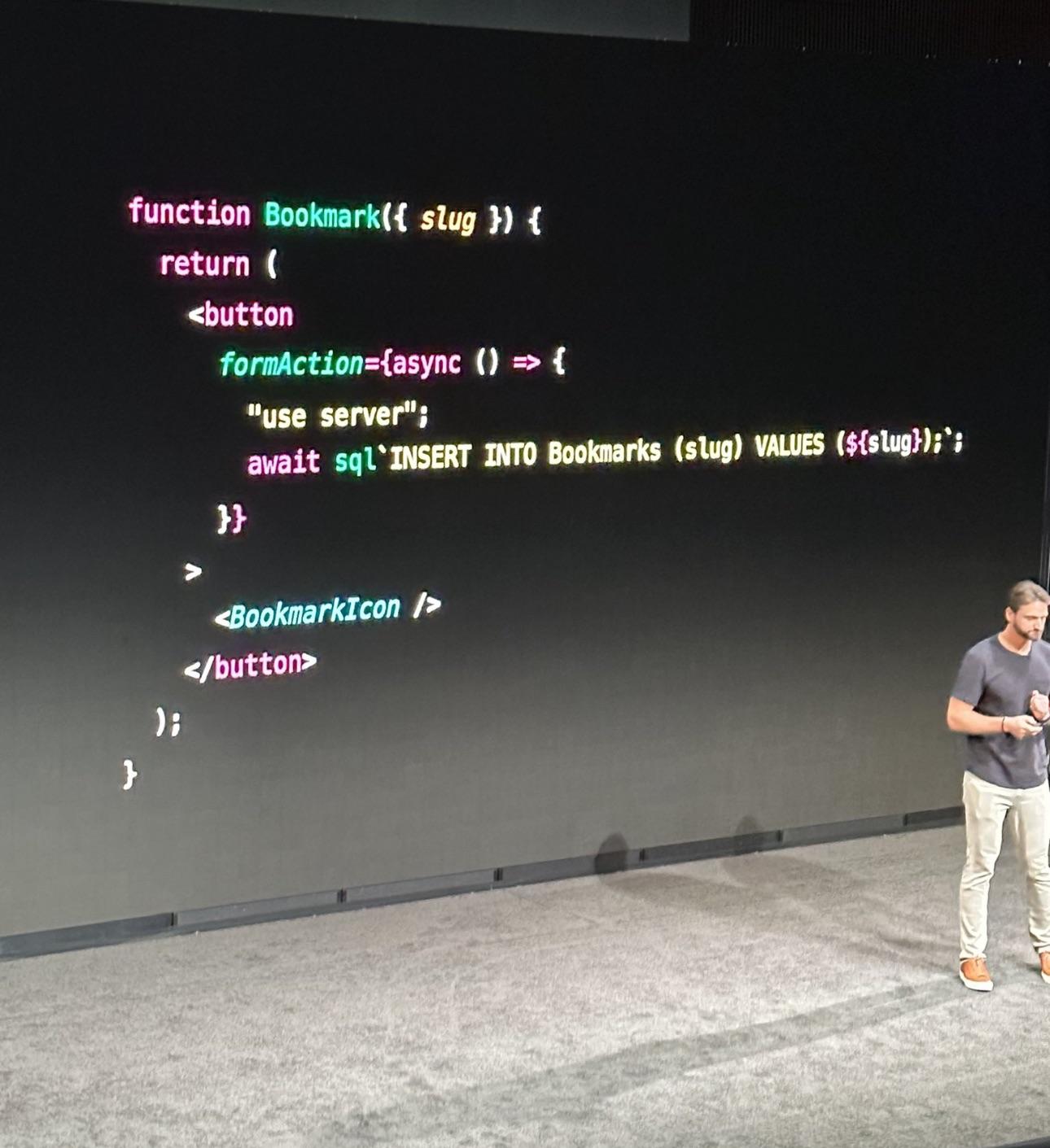
The questionable code in more readable form:
function Bookmark({ slug }) {
  return (
    <button
      formAction={async () => {
        "use server";
        await sql`INSERT INTO Bookmarks (slug) VALUES (${slug})`;
      }}
    >
      <BookmarkIcon />
    </button>
  );
}
To be honest, I think the slide is great. Within a handful of lines it
transports the whole idea. Unfortunately one half of the audience didn't get the
"use server" part, and the other was laser focused on the potential sql
injection. Nerds.
What happens under the hood is that the React framework automatically creates an
HTTP endpoint for each function declared with "use server" that is invoked
when the client would call that function. On a technical level this is super
impressive, but I'm not sold on the benefit/complexity ratio. Ultimately, we
probably wouldn't really write SQL statements directly into components, but
rather call a method that can be tested in isolation.
function Bookmark({ slug }) {
  return (
    <button
      formAction={async () => {
        "use server";
        await toggleBookmark(slug);
      }}
    >
      <BookmarkIcon />
    </button>
  );
}
On the other hand, without server functions we would probably provide an API endpoint for triggering bookmarks and wrap it in a function on the client side.
function Bookmark({ slug }) {
  return (
    <button
      formAction={async () => {
        await toggleBookmark(slug);
      }}
    >
      <BookmarkIcon />
    </button>
  );
}
The difference between the two approaches is hard to spot. I think it is still a good idea to separate data modeling from UI code, and if that is done, the developer experience is almost identical in both cases.
There is a concrete technical benefit to the server functions version though. The "client side plus api" approach will not work before the page is fully hydrated. The server functions implementation will gracefully fall back to standard HTTP navigation and will work immediately. So it does shave off some milliseconds from the "time to interactive" metric.
However, it is exactly that code that caused the React2Shell vulnerability, which hit every framework and website that was using React, no matter if it actually used server functions or not. Having this enabled by default is irresponsible and most likely a part of the SSR conspiracy that I already wrote about. I'm sure Guillermo would love every developer to be used to writing server code like this. And when it gets hard to scale, just deploy it to Vercel!
Conclusion#
The server features of React are a mixed bag. The power and flexibility server components bring - even in non-mainstream scenarios like static site generation - are unmatched by other frameworks. But components that move between environments can also create a serious mental burden and produce hard to debug issues. Astro's strict separation between server and client components is less capable, but undeniably easier to reason about.
The use of server functions should be a very deliberate decision, and if AI agents assume it is the default in the future[3], we should question them. Which is our primary job now anyway.
Footnotes#
-
We have been rendering on the server for quite some time after all. [↩]
-
If
"use client"satisfies the term "coherent" is subject of very lively discussions. [↩] -
And framework vendors will have an interest in that. [↩]